
If ChatGPT tells a buyer your product can’t do something it can, you lose a sale you never knew about. If it says your product can do something it can’t, you get a refund request instead. Most GEO (generative engine optimization) and AEO (answer engine optimization) work measures whether AI tools mention you at all. I wanted to know whether they get the details right.
So I built a tool that asks ChatGPT and Gemini the questions real buyers ask about GravityKit (a WordPress plugin developer, and the company where I work), then grades each answer against GravityKit’s own website. Where the site answered a question clearly, the engines got it right 88% of the time. Where it didn’t, that fell to 63%.
Every wrong or shaky answer becomes a to-do on a tracker I’ve shared with my team, so my team and I can fix the website one question at a time. I built it with Claude Code, and a full run cost me $1.20 in API credits.
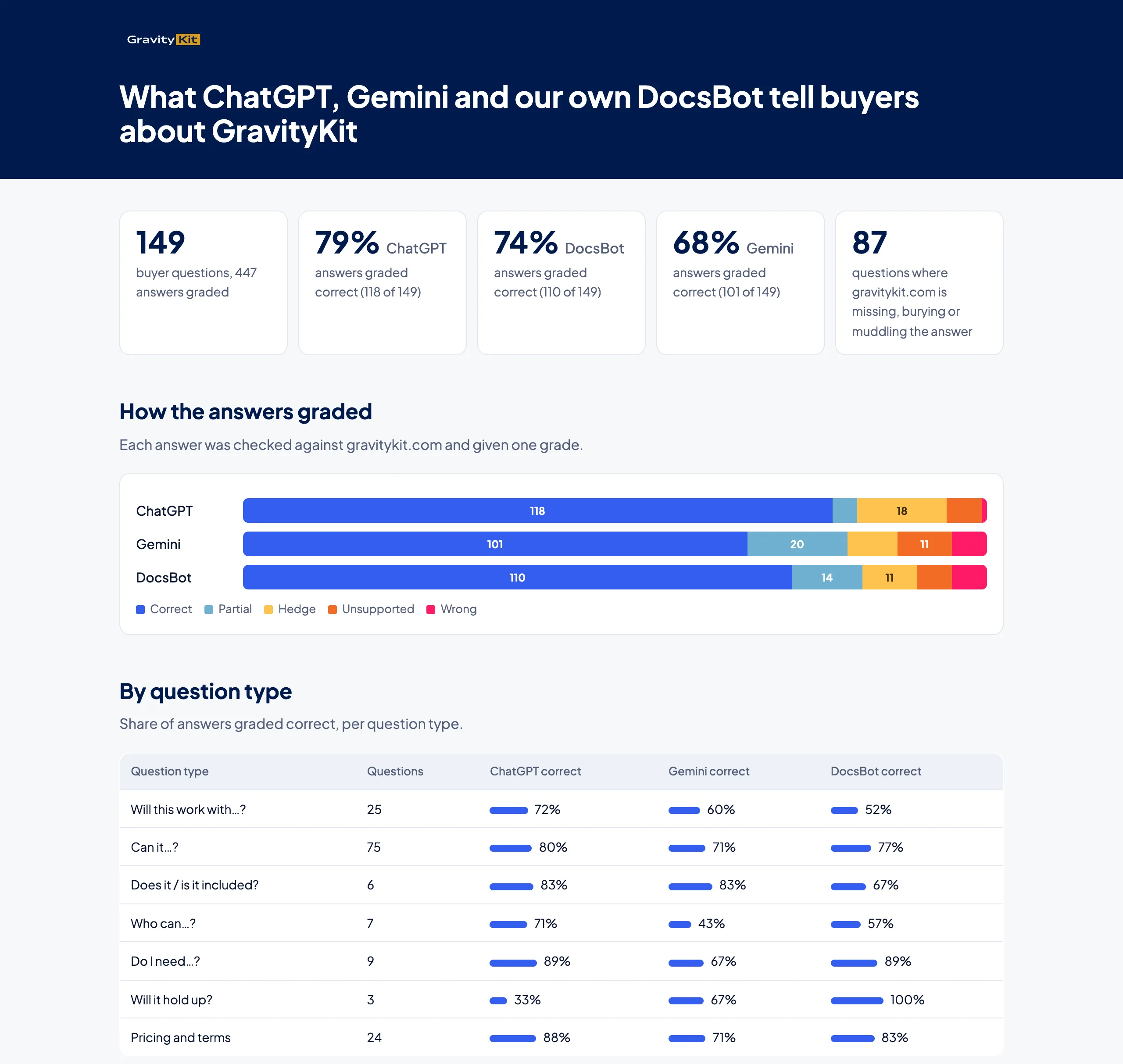
The article that started it
The idea came from a Forrester piece, Agentic commerce exposes the missing dimension in product data. Its argument is that product information is built for filters and spec sheets, while buyers (and the AI agents shopping on their behalf) ask application questions: “Will it…”, “Can it…”, “Does it…”, “Will this work with…”.
When your website doesn’t answer one of those questions, the agent guesses. The buyer never sees the guess for what it is. They just get an answer.
Forrester’s advice is to collect those questions from support, site search and sales, test them against the answer engines and your own assistant, and log where the answers hedge or guess. Most AI rank trackers can’t tell you that, so I built a tool for it myself.
Why not use a paid tool?
Plenty of tools already track AI visibility, and they do it well. Ahrefs Brand Radar runs hundreds of millions of search-backed prompts through ChatGPT, Gemini, Perplexity, Copilot and Google’s AI answers, and measures how often your brand is mentioned or cited. Otterly and Profound track the same engines across a set of prompts you choose.
These tools are built around share of voice: whether you’re mentioned, how often, next to which competitors, and which sites get cited. That’s a useful question, and it’s a different one from mine.
I wanted to know whether the answer about GravityKit was correct, question by question, with a link to the page that proves it. A confident “yes, it can do that” about a feature that doesn’t exist costs more than no mention at all.
The prompts differ too. Visibility tools track broad category questions, such as “best WordPress directory plugin”. Buyers ask about their own setup: the website builder they already use, another add-on they rely on, the version they’re running.
These tools run every day and track competitors, which mine doesn’t, and they cost anywhere from $29 a month to custom enterprise pricing. My setup is a run I can repeat whenever I want, for about the price of a coffee. (For the traffic side of AI search, I wrote up a Looker Studio dashboard for AI referral traffic last year.)
Step 1: Collect the questions buyers ask
Forrester’s four question types map neatly onto software:
- Will it questions are about outcomes (“Will it show form submissions on a map?”)
- Can it questions are about capabilities (“Can it export to PDF?”)
- Does it questions are about what’s included (“Does the Pro plan include the extra layouts?”)
- Will this work with questions are about compatibility (“Will this work with the website builder I already use?”)
Two more types showed up in GravityKit’s data: who can do what (permissions, such as letting customers edit their own submissions) and terms (licensing, renewals and refunds).
Real questions from chatbot logs and support tickets
I didn’t write the questions myself. Claude pulled a year of messages from GravityKit’s support chatbot and the first message of every support ticket, then kept the ones that started with “Will”, “Can”, “Does” or “Is it compatible”. It removed how-to questions and duplicates, which left 149 questions in total.
The real wording matters more than I expected. Buyers name the exact tools and versions they’re using, and that kind of detail is exactly where websites go quiet.
Step 2: Prompt ChatGPT and Gemini for about a dollar
I used DataForSEO’s LLM Scraper API. You send it a question, and it asks ChatGPT or Gemini and returns the answer as structured data. In live mode, each call costs $0.004, so 149 questions across two engines came to about $1.20.
Why a scraper beats calling the model’s API
You could send the same 149 questions to the OpenAI and Gemini APIs directly. But for this job, the scraper is the better choice. Here’s why:
- It captures the answer as it appears in the ChatGPT or Gemini app, which is what a buyer sees. An API call returns raw model output, with different defaults and none of the app’s own instructions.
- The app searches the web before it answers. An API call only does that if you switch it on and configure it.
- You get the sources the answer cited, plus every page it looked at. That tells you which of your pages the engine read, and which it skipped.
- For ChatGPT, you also get the searches it ran behind the answer, often referred to as fan-out queries.
- It reports which model actually answered. In my run, the Gemini app served its Flash-Lite model, which isn’t the one I’d have picked through the API.
Don’t forget to prompt your own chatbot
GravityKit runs a DocsBot assistant trained on its documentation, and DocsBot wrote up how GravityKit uses it for front-line support. So the same 149 questions went to it through the DocsBot API. Each one was sent as a tagged test chat, which keeps them out of the real support stats.
This turned out to be one of the more interesting comparisons. The chatbot reads the same documentation as everyone else, so where it went wrong, the documentation was usually the problem.
Step 3: Grade every answer against your own site
For each question, I had Claude find what GravityKit’s website says and save the link to that page. Then it graded every answer against it, with a one-line reason:
- Correct: matches the site
- Partial: right answer, with one overclaim or a missing caveat
- Hedge: vague or misleading lead
- Unsupported: a confident claim that no page on the site backs up
- Wrong: contradicts the site
It also tagged each question with the state of the site’s answer: answered clearly, buried (on the site but hard to find), missing, or unclear.
The results page shows each question with what the site says next to all three graded answers.
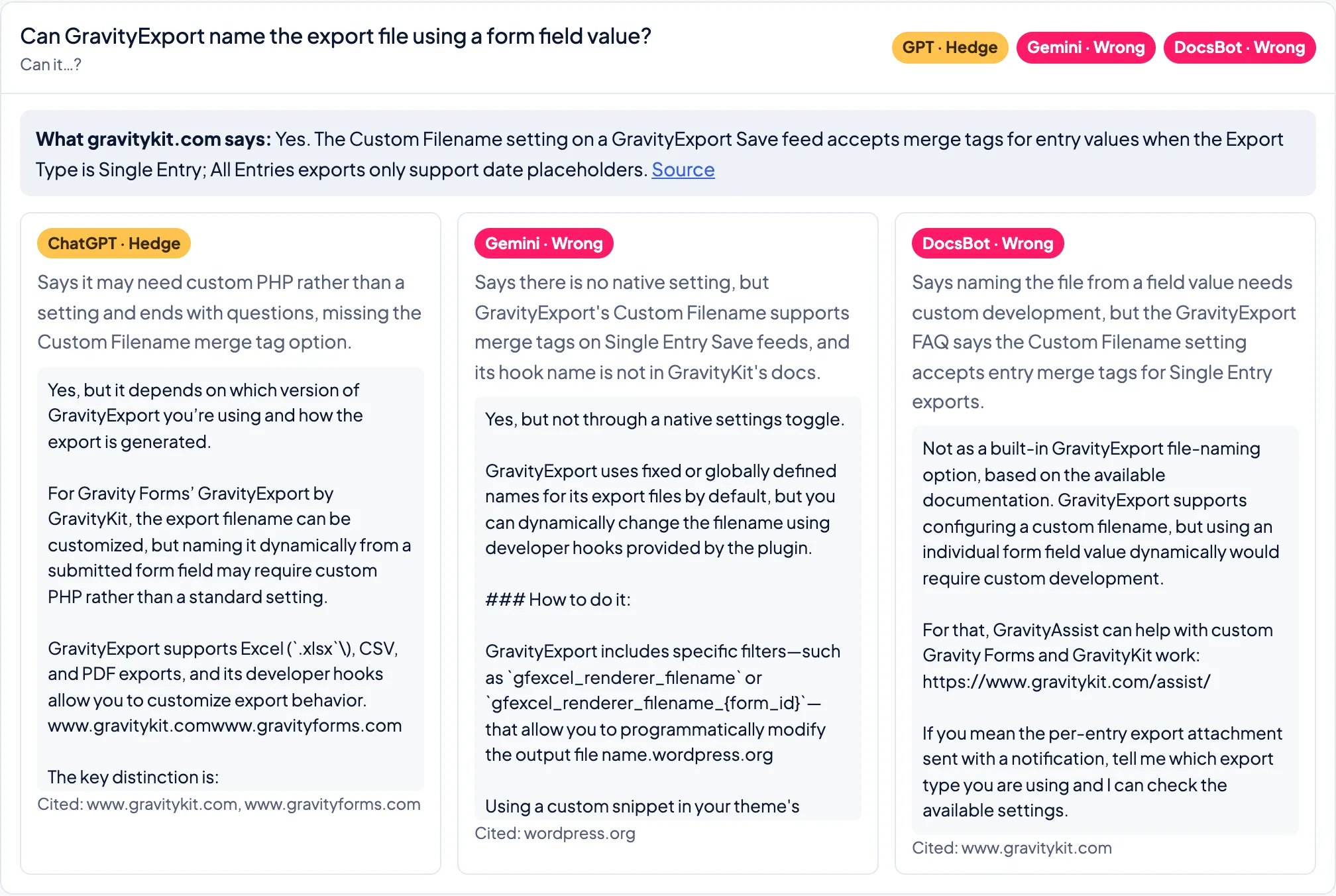
I spot-checked the grades and corrected a few. One relied on an old page that should have been taken down. Another led somewhere more interesting.
GravityKit’s site has markdown versions of its pages: plain-text copies built for AI tools to read, which skip the menus, scripts and styling. While I was digging into one answer, the plan comparison table on the pricing page looked as if it had no check marks at all.
On the page itself, everything looked fine. The markdown copy was the problem: it didn’t always match the regular page, and in this case the table came through with its check marks missing, while the HTML version had the right content all along.
That went to the developers as an issue to fix, and it’s a reminder to check what AI tools are actually reading, which isn’t always the page you see.
What the grades showed
The headline result, 88% right where the site answers clearly and 63% where it doesn’t, is about the website more than the engines.
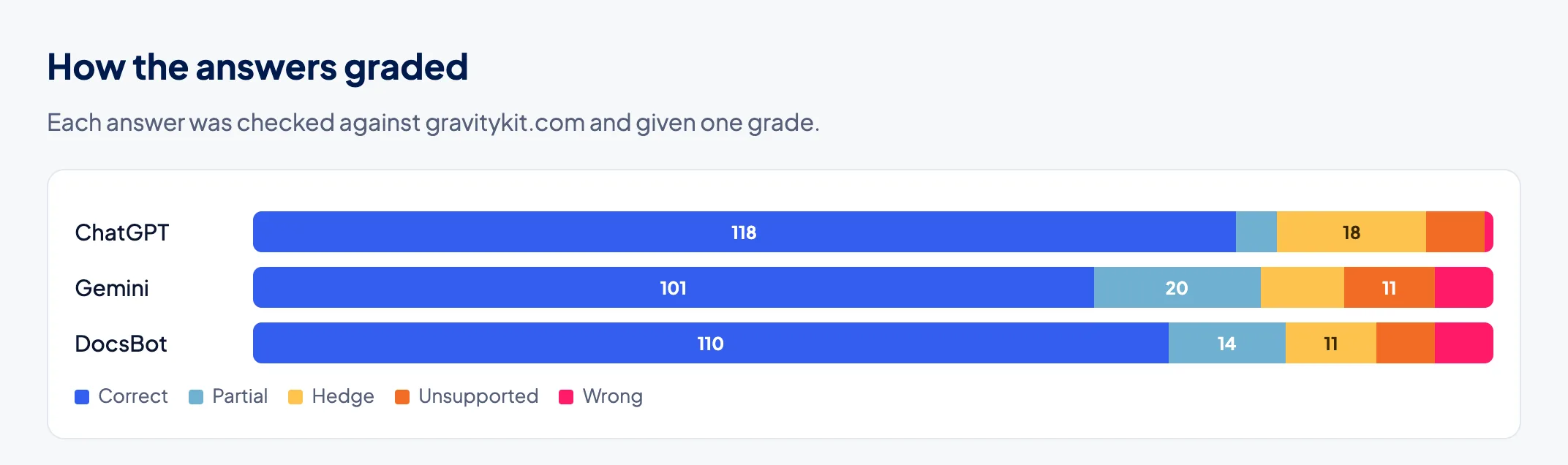
Flat-wrong answers were rare, between one and seven per engine. Hedges, partial answers and unsupported claims were far more common. When the site was silent, the engines filled the gap with something plausible.
The 149 questions turned up 87 gaps: 36 answers were buried, 34 were missing and 17 were unclear. In a five-question pilot before the full run, gravitykit.com was the main source for all ten answers (five questions, two engines). The engines are reading the site, so the fix belongs on the site, which is the content quality pillar from my 7 pillars of GEO in practice.
Step 4: Turn the gaps into a tracker
A list of 87 problems is easy to admire and then ignore, so the results page also has an answer tracker. Each gap has the correct answer, a confidence level, where the answer was checked and where the fix belongs (a help article or a product page).
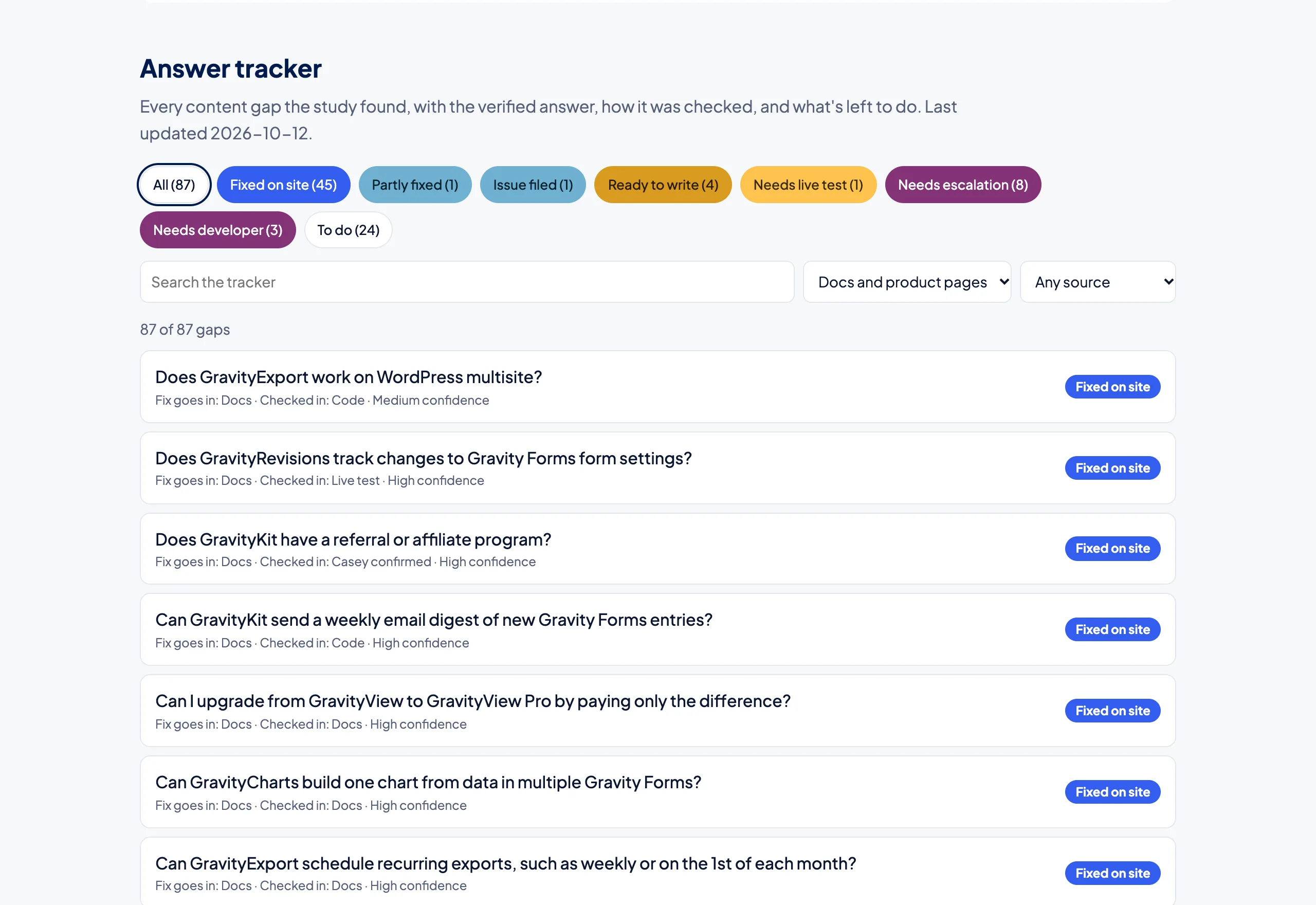
Filters by status and fix location turn it into a to-do list. Each gap has a status that runs from to do through to fixed, with stops in between for anything waiting on a developer or a product decision.
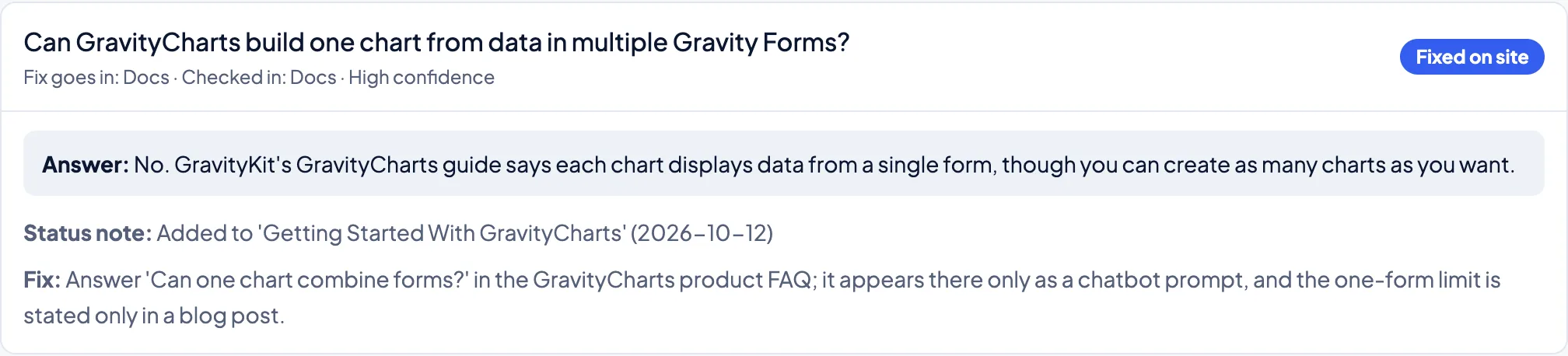
Checking each answer in the code or with a live test
Some answers needed proof before anyone published them. Claude read the product’s source code to confirm a setting or a default. Where the code wasn’t clear, it ran a live test on a local copy of a demo website, such as importing a spreadsheet and checking what showed up on the page, and wrote down the result.
A few questions needed a person who knows the product roadmap, so those went on the agenda for the next marketing meeting. The confidence level sits on the tracker for a reason: I don’t want a guess published as a fact, which is the exact problem I’m trying to fix.
Hosting it on Spacefast so the team can see it
Claude built the results page and the tracker as a plain HTML page with a data file, then published it with Spacefast’s plugin for Claude Code. That gave me a hosted page in minutes, with no server to set up. It’s private by default, and I can invite teammates or create a share link.
Every update is a new version. When a gap gets fixed, Claude updates the data file and republishes to the same link, so the team always sees the current state. Spacefast apps can also run scheduled jobs, so the next version can rerun the questions on a monthly timer and show whether the answers change as the site improves.
Step 5: Fix, verify and rerun
I worked through the gaps in order of damage. Contradictions came first (pages that said the wrong thing), then short additions to existing help articles, then product pages, which need more care because they’re also sales pages.
Every draft went on a review page where I could comment on specific sentences before anything went live. Once I approved a change, Claude made the edit with Block MCP, GravityKit’s free WordPress connector for AI agents.
It edits one block of a page at a time, so Claude could add a sentence to a live help article without touching the rest of it. Claude backed up each page first, checked the live page afterwards and updated the tracker.
The next step is the rerun: the same 149 questions and the same engines, to see whether the answers change now that the site says more.
What I’d do differently
- Lock the grading rubric before the full run. I refined the grade definitions after the pilot, and it’s cleaner to start with them fixed.
- Plan the rerun from day one, so the before and after are directly comparable.
- Check how pages render for AI tools before calling something a content gap. Some gaps are really rendering issues in disguise, like the pricing table that lost its check marks.
Building your own
You need four things: a list of real buyer questions, a DataForSEO API key (or another LLM scraper), your chatbot’s API if you have one, and an AI coding agent to glue it together and do the grading. Start with 50 to 100 questions from support conversations; a keyword tool won’t give you the buyer’s wording.
Grade against your own pages, and keep the link for every answer. Then put the gaps somewhere your team will see them every week. If you ran your 20 most common pre-sale questions through ChatGPT today, how many would it get right?